
Interactive Video Tools That Elevate Student Learning

A tool that makes your video resources interactive

A cartoon illustration featuring a blue droplet character using a laptop. On the screen, a yellow triangular character wearing glasses and a graduation cap appears to be explaining something. A light bulb icon and books are visible in the background.

Interactive Video Tools That Elevate Student Learning

A tool that makes your video resources interactive

A cartoon illustration featuring a blue droplet character using a laptop. On the screen, a yellow triangular character wearing glasses and a graduation cap appears to be explaining something. A light bulb icon and books are visible in the background.

Interactive Video Tools That Elevate Student Learning

A tool that makes your video resources interactive
A cartoon illustration featuring a blue droplet character using a laptop. On the screen, a yellow triangular character wearing glasses and a graduation cap appears to be explaining something. A light bulb icon and books are visible in the background.

Creating Engagement

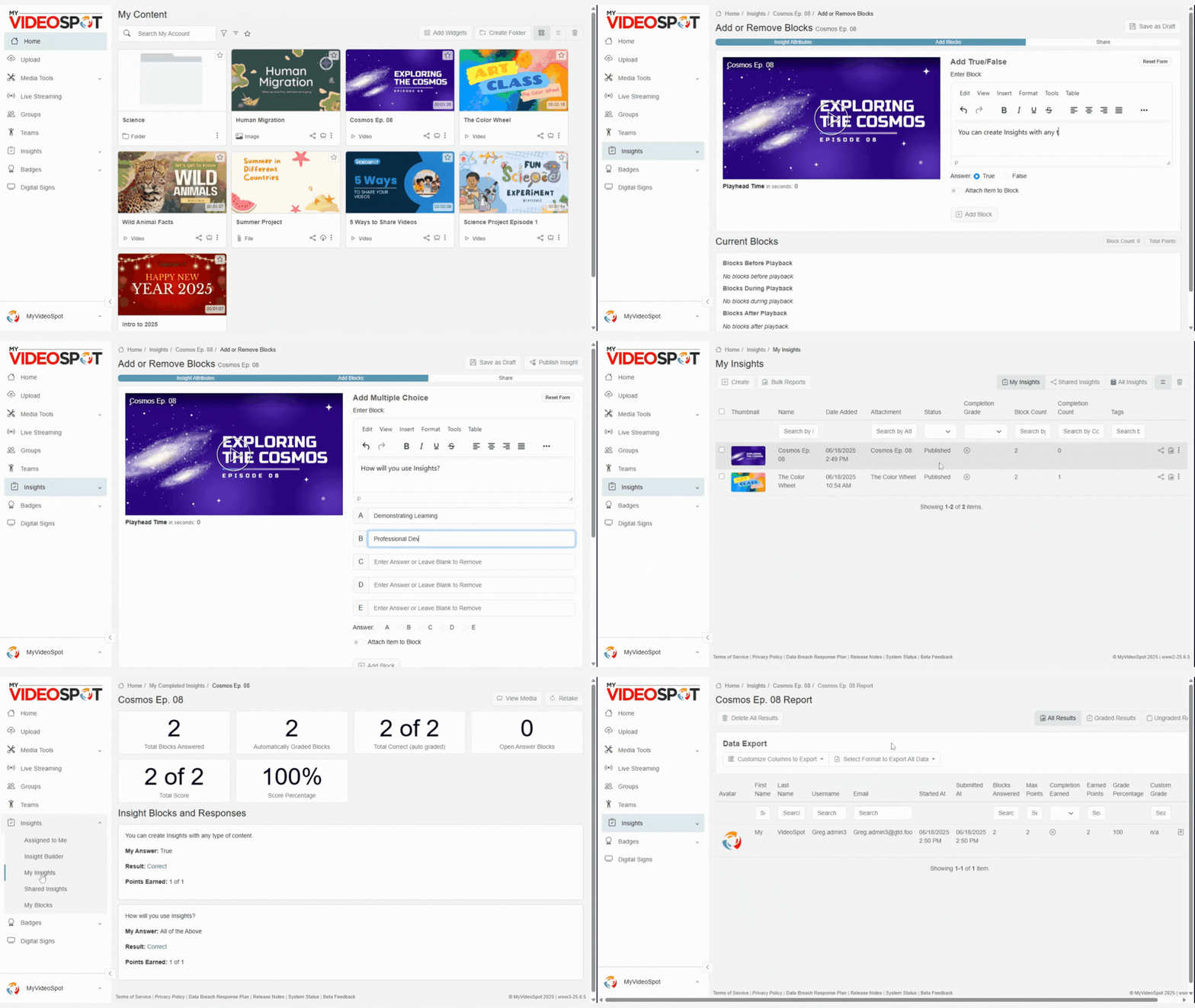
An Insight is an interactive experience that you attach to content. For example, a teacher can add multiple choice questions or a reflection prompt to a video file.

The beauty of Insights is that they build interaction into otherwise static content. This results in more purposeful, engaging videos for both students and staff.

Creating Engagement

An Insight is an interactive experience that you attach to content. For example, a teacher can add multiple choice questions or a reflection prompt to a video file.

The beauty of Insights is that they build interaction into otherwise static content. This results in more purposeful, engaging videos for both students and staff.

Creating Engagement

An Insight is an interactive experience that you attach to content. For example, a teacher can add multiple choice questions or a reflection prompt to a video file.

The beauty of Insights is that they build interaction into otherwise static content. This results in more purposeful, engaging videos for both students and staff.

Insights Gif 1 - Insights - MyVideoSpot

Types of Insights 

Choose the Insight that pushes your content’s goals. These are all supported by MyVideoSpot’s active video learning software:

Perfect for checking comprehension and verifying completion.
Customizable, with up to 5 answer choices (A and B required).
Specify the answer and variations as needed (i.e. capitalization and punctuation).
Add up to 20 pairs of items
Add up to 10 items

Prompts users to type or upload a file. Review these answers manually.

Insights Gif 1 - Insights - MyVideoSpot

Types of Insights 

Choose the Insight that pushes your content’s goals. These are all supported by MyVideoSpot’s active video learning software:

Perfect for checking comprehension and verifying completion.
Customizable, with up to 5 answer choices (A and B required).
Specify the answer and variations as needed (i.e. capitalization and punctuation).
Add up to 20 pairs of items
Add up to 10 items

Prompts users to type or upload a file. Review these answers manually.

Insights Gif 1 - Insights - MyVideoSpot

Types of Insights 

Choose the Insight that pushes your content’s goals. These are all supported by MyVideoSpot’s active video learning software:

Perfect for checking comprehension and verifying completion.
Customizable, with up to 5 answer choices (A and B required).
Specify the answer and variations as needed (i.e. capitalization and punctuation).
Add up to 20 pairs of items
Add up to 10 items

Prompts users to type or upload a file. Review these answers manually.

Adapt for Any Content

Add Insights to videos, images, text, audio, or even slides. Any content can become interactive.

Share and Reuse

Set your Insights to be duplicable by other users in your organization – a good interactive video learning platform fosters sharing and collaboration.

Analyze Reports

Note who watched, who responded, and where people dropped off. Use that knowledge to improve your future interactive video learning.

Embrace Accessibility

Set Insights to be read aloud and add closed captions. MyVideoSpot strives to make an accessible interactive video platform.

Adapt for Any Content

Add Insights to videos, images, text, audio, or even slides. Any content can become interactive.

Share and Reuse

Set your Insights to be duplicable by other users in your organization – a good interactive video learning platform fosters sharing and collaboration.

Analyze Reports

Note who watched, who responded, and where people dropped off. Use that knowledge to improve your future interactive video learning.

Embrace Accessibility

Set Insights to be read aloud and add closed captions. MyVideoSpot strives to make an accessible interactive video platform.

Adapt for Any Content

Add Insights to videos, images, text, audio, or even slides. Any content can become interactive.

Share and Reuse

Set your Insights to be duplicable by other users in your organization – a good interactive video learning platform fosters sharing and collaboration.

Analyze Reports

Note who watched, who responded, and where people dropped off. Use that knowledge to improve your future interactive video learning.

Embrace Accessibility

Set Insights to be read aloud and add closed captions. MyVideoSpot strives to make an accessible interactive video platform.

Using your Interactive Video Tools

A teacher adds multiple-choice questions to a video lesson.

A district admin adds true-false questions to district-wide training materials.

A hiring team invites applicants to upload video or written introductions.

A communications team shares a new staff policy that prompts followup questions.

Does your content resonate? Are viewers engaging with it? Add Insights to find those answers.

Using your Interactive Video Tools

A teacher adds multiple-choice questions to a video lesson.

A district admin adds true-false questions to district-wide training materials.

A hiring team invites applicants to upload video or written introductions.

A communications team shares a new staff policy that prompts followup questions.

Does your content resonate? Are viewers engaging with it? Add Insights to find those answers.

Using your Interactive Video Tools

A teacher adds multiple-choice questions to a video lesson.

A district admin adds true-false questions to district-wide training materials.

A hiring team invites applicants to upload video or written introductions.

A communications team shares a new staff policy that prompts followup questions.

Does your content resonate? Are viewers engaging with it? Add Insights to find those answers.

Using Video Strategically 

We believe that content should spark action, not just be consumed. Even the simplest feedback can lead to big improvements in how we teach, train, and communicate.

Education is headed towards a future where video is more interactive, measurable, and human. Insights are just the first step. 

An animated orange character with a headband is holding a piece of paper marked with a line graph. The character has a friendly expression and is outlined in black.

Using Video Strategically 

We believe that content should spark action, not just be consumed. Even the simplest feedback can lead to big improvements in how we teach, train, and communicate.

Education is headed towards a future where video is more interactive, measurable, and human. Insights are just the first step. 

An animated orange character with a headband is holding a piece of paper marked with a line graph. The character has a friendly expression and is outlined in black.

Using Video Strategically 

We believe that content should spark action, not just be consumed. Even the simplest feedback can lead to big improvements in how we teach, train, and communicate.

Education is headed towards a future where video is more interactive, measurable, and human. Insights are just the first step. 

An animated orange character with a headband is holding a piece of paper marked with a line graph. The character has a friendly expression and is outlined in black.

Content With Built-in Feedback

Insights are just one tool in our interactive video platform for education. Learn how they make your content work for you.

Content With Built-in Feedback

Insights are just one tool in our interactive video platform for education. Learn how they make your content work for you.

Content With Built-in Feedback

Insights are just one tool in our interactive video platform for education. Learn how they make your content work for you.